

Budgets

Most parental-control products give each device a limit. The phone gets two hours, the console gets two hours, the PC gets two hours — and a determined child quietly banks six. A budget here works the other way around: one daily budget per child, counted across all their devices together. Phone, console, PC, TV — one pool. When it is spent, it is spent everywhere. No commercial product we know of does this, which is exactly why it is the centre of this app.
One child, one number
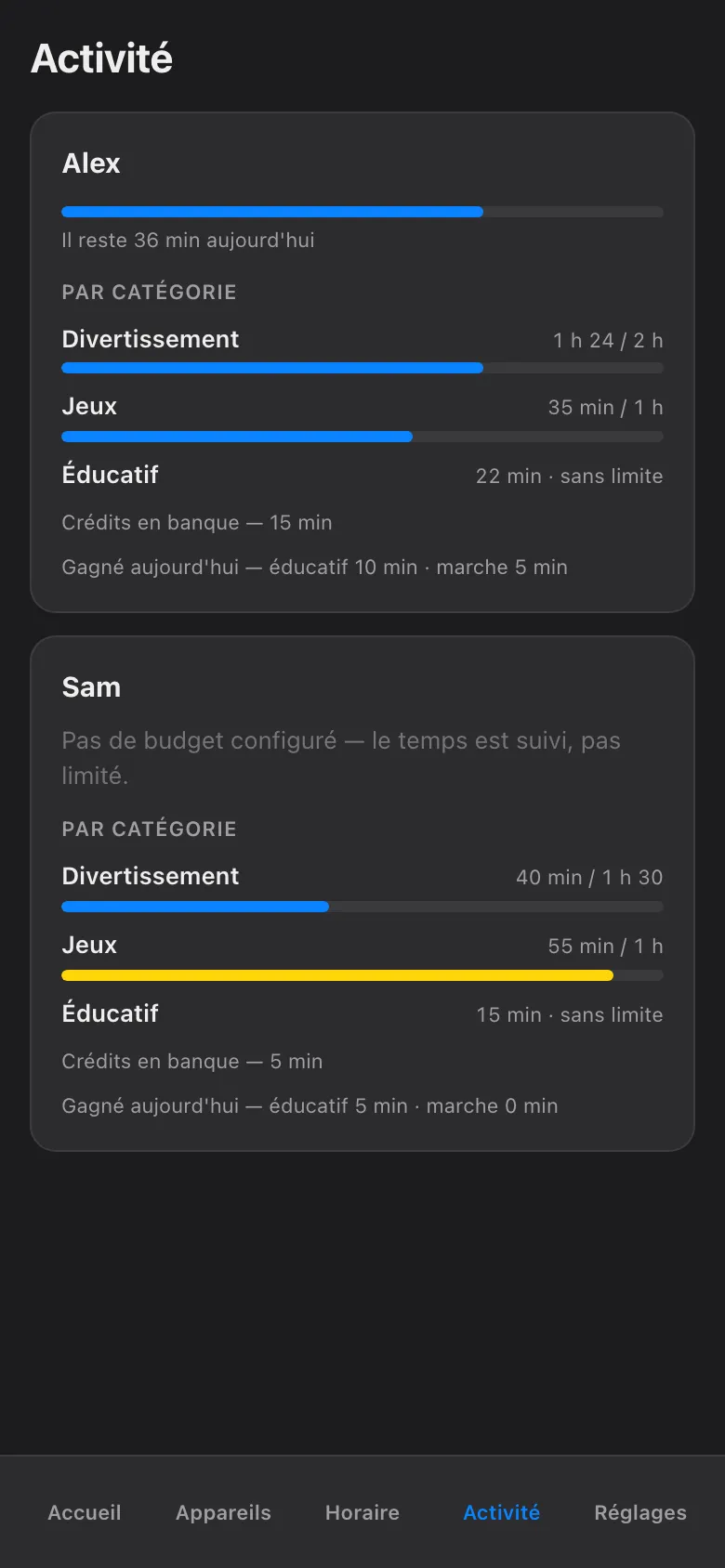
Section titled “One child, one number”Open Budget from a child’s card and you get a single bar for the day. It does not care where the minutes went — forty on the console and twenty on the phone read the same as sixty on either one. The child can move between screens freely; the total is what the total is.
This closes the oldest loophole in the haus: “I finished my time on the tablet, so now I’m on the TV.” With a per-child budget there is no now — it is all the same time.
How the counting works
Section titled “How the counting works”The budget is not an app on the child’s screen keeping a diary, and it does not depend on the child’s device telling the truth about itself. The haus network meters real activity, by category, as it happens. Traffic from the child’s devices is observed at the network, sorted into categories of activity, and summed into their one daily pool.
Three consequences worth knowing:
- It cannot be uninstalled. There is nothing on the device to delete or disable — the counting happens on the network the device is using.
- It counts what actually happened. Not screen-on time, not “the app was open in the background” — observed network activity, grouped by category, so the daily report tells you what the time actually was, not just how long it lasted.
- It follows the child. A new device on the network gets attributed to its owner, and its minutes flow into the same pool as everything else they use.
Shadow versus armed — the honest part
Section titled “Shadow versus armed — the honest part”Every budget is in one of two modes, and the screen always tells you which:
-
Shadow (ombre). The budget is being measured and shown, but not enforced. The bar fills, the daily report is real, and when the pool runs out — nothing turns off. Shadow is the log-only rehearsal: you watch a normal week go by and learn what the honest numbers are before any rule bites.
-
Armed (armé). The same budget, now enforced. When the pool is spent, the network stops carrying that child’s screen traffic, and the block is confirmed by the Firewalla — the box that runs the haus network — before the app shows it as done. This is the same closed-loop verification that backs every stop in the haus: if a device did not actually comply, the card goes red and says so. It never shows a fake green.
We say this plainly because vague is worse: if your budget is still in shadow, it is not limiting anything yet. It is easy to set a budget, see the bar, and believe the job is done. Check the label. Shadow means watching; armed means acting. Arming is a deliberate step you take once the shadow numbers have convinced you the budget is fair — and fair budgets get argued about a great deal less.
When the budget runs out
Section titled “When the budget runs out”An armed budget that hits zero behaves like every other stop in this app: visibly, and with an exit.
- Every hold shows its owner and its expiry. The child’s screen — and yours — says what is limiting the device, who set it, and when it ends. Nothing here blocks forever, and nothing blocks anonymously.
- You can still say yes. The Plus de temps (More time) screen grants a quick override — capped at 120 minutes, hard stop — or a credit that genuinely adds minutes to today’s pool. An override lifts the limit for a little while; a credit makes the budget bigger and lets the normal rules do the rest.
- Tomorrow resets it. The budget is daily. A spent Tuesday does not mortgage Wednesday.
And if you ever reach past the budget entirely — a manual Block Now, say — the same haus rules apply: it expires at the next wake by default, and any pause you set names who set it and how long it lasts, with jusqu’au réveil (until wake-up) as the maximum.
The screenshots show the French phone view, as the haus runs it; in English the screen reads Budget, with everything in the same places. The budget does not negotiate, which — you may notice around 21:40 — is precisely what makes it the calmest member of the family.