

Config System
Sanctum follows a single-source-of-truth principle: one YAML file defines the entire instance. Every service, script, dashboard, and LaunchAgent reads its configuration from this file — either directly or through generated artifacts. Secrets are stored separately in macOS Keychain and never appear in configuration files.

This is either an act of elegant simplicity or a magnificent dare. One file. One indentation error away from a very quiet house.
Configuration Hierarchy
Section titled “Configuration Hierarchy”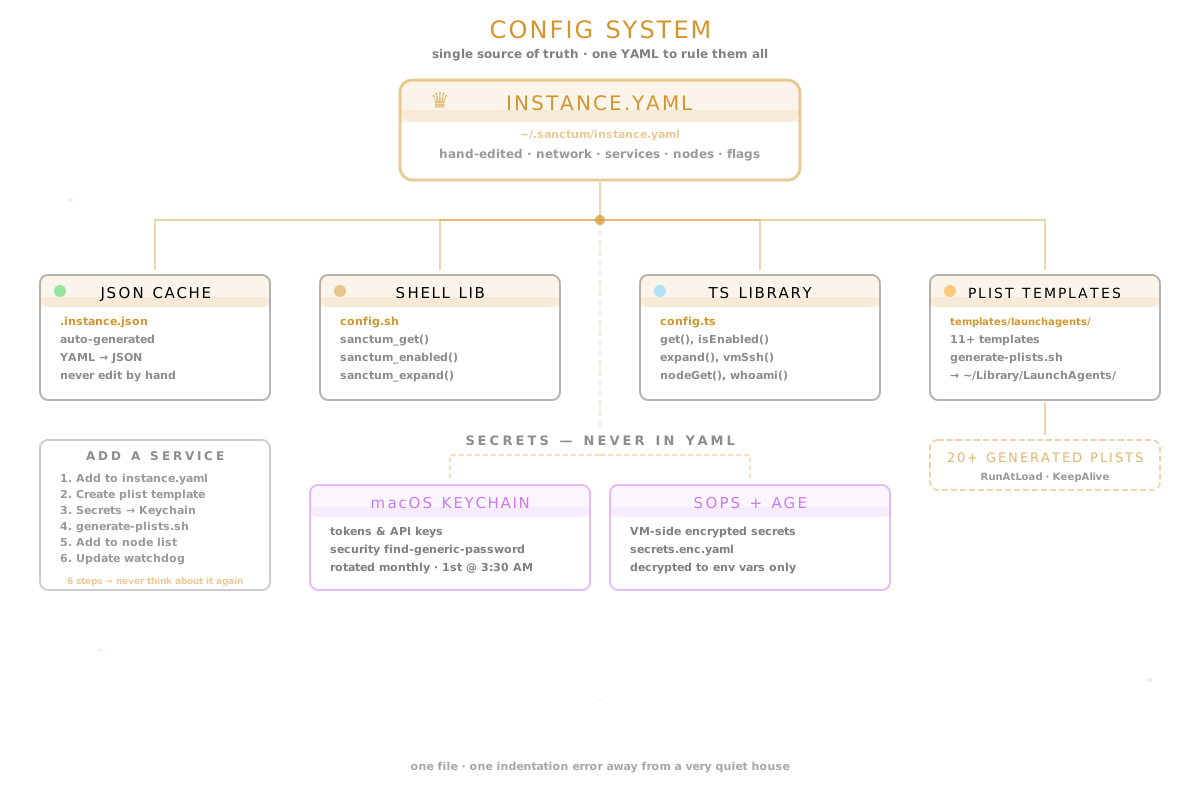
Everything flows down from that YAML file at the top. If you’re looking for the single point of failure, you found it. If you’re looking for the single source of truth, you also found it. Schrodinger’s architecture decision: genius and catastrophe in the same file, and you won’t know which until you open it.
instance.yaml
Section titled “instance.yaml”The central configuration file lives at ~/.sanctum/instance.yaml. It contains every instance-specific value: network addresses, service ports, node definitions, feature flags, and integration settings.
instance:  name: "Manoir Nepveu"  slug: manoir-nepveu  domain: nepveu.name
network:  lan_subnet: 192.168.1.0/24  vm_subnet: 10.10.10.0/24  gateway_ip: 192.168.1.1  mac_bridge_ip: 10.10.10.1  vm_ip: 10.10.10.10
services:  gateway:    enabled: true    port: 1977  home_assistant:    enabled: true    port: 8123    homekit_port: 21063  dashboard:    enabled: true    port: 1111  lm_studio:    enabled: true    port: 1234  council_mlx:    enabled: true    port: 1337  voice_agent:    enabled: true    port: 8090  # ... additional services
nodes: manoir: type: hub host: 192.168.1.10 tailscale_ip: 100.112.178.25 ssh_user: bert services: [gateway, home_assistant, dashboard, voice_agent] chalet: type: satellite host: null # set during on-site install tailscale_ip: 100.112.203.32 ssh_user: bert services: [gateway, home_assistant]JSON Cache
Section titled “JSON Cache”The JSON cache at ~/.sanctum/.instance.json is an auto-generated derivative of the YAML file. It exists so that shell scripts and lightweight tools can parse configuration without a YAML library.
# Regenerate the cache manually (normally automatic)python3 ~/.sanctum/lib/yaml2json.pyThe cache is regenerated automatically whenever configuration libraries detect the YAML file is newer than the JSON. Never edit .instance.json by hand — changes will be overwritten. This is not a suggestion. The file is named with a dot prefix for a reason. It is trying to hide from you.
Shell Library
Section titled “Shell Library”Source config.sh in any Bash script to get access to configuration values:
source ~/.sanctum/lib/config.shAvailable Functions
Section titled “Available Functions”| Function | Description | Example |
|---|---|---|
sanctum_get <path> | Read a value by dotted path | sanctum_get services.gateway.port |
sanctum_slug | Return the instance slug | manoir-nepveu |
sanctum_home | Return the Sanctum haus directory | ~/.sanctum |
sanctum_vm_ssh | Return the VM SSH target | [email protected] |
sanctum_enabled <service> | Check if a service is enabled | sanctum_enabled voice_agent |
sanctum_expand <template> | Expand {{PLACEHOLDER}} strings | See below |
sanctum_whoami | Return this node’s identity | manoir |
sanctum_node_get <node> <path> | Read a value from a specific node | sanctum_node_get chalet tailscale_ip |
Usage Example
Section titled “Usage Example”#!/bin/bashsource ~/.sanctum/lib/config.sh
if sanctum_enabled voice_agent; then PORT=$(sanctum_get services.voice_agent.port) echo "Voice agent running on port $PORT"fi
VM=$(sanctum_vm_ssh)ssh "$VM" 'systemctl --user status openclaw-gateway'TypeScript Library
Section titled “TypeScript Library”The TypeScript library provides the same capabilities for Node.js services like the command center dashboard and gateway plugins.
import { get, isEnabled, expand, vmSsh, whoami, nodeGet, getNodesByType } from './lib/config';Available Functions
Section titled “Available Functions”| Function | Description | Return Type |
|---|---|---|
get(path) | Read a value by dotted path | string | number | boolean | object |
isEnabled(service) | Check if a service is enabled | boolean |
expand(template) | Replace {{PLACEHOLDER}} tokens | string |
vmSsh() | Return the VM SSH connection string | string |
whoami() | Return this node’s identity | string |
nodeGet(node, path) | Read a value from a specific node | string | number | boolean |
getNodesByType(type) | List nodes of a given type | string[] |
Usage Example
Section titled “Usage Example”import { get, isEnabled } from './lib/config';
const port = get('services.dashboard.port') as number; // 1111
if (isEnabled('home_assistant')) { const haPort = get('services.home_assistant.port'); console.log(`HA available at http://localhost:${haPort}`);}Plist Templates
Section titled “Plist Templates”LaunchAgent plist files are generated from templates rather than hand-maintained. This ensures every plist stays in sync with instance.yaml and that secrets are injected at generation time from macOS Keychain.
If you’ve ever manually edited 11 plist files, changed a port number, missed one, and then spent 45 minutes watching logs from the wrong service — this system exists because of you. Well. Because of us.
Templates live in ~/.sanctum/templates/launchagents/ and use a {{PLACEHOLDER}} syntax:
<!-- Template: com.sanctum.gateway.plist --><?xml version="1.0" encoding="UTF-8"?><!DOCTYPE plist PUBLIC "-//Apple//DTD PLIST 1.0//EN" "http://www.apple.com/DTDs/PropertyList-1.0.dtd"><plist version="1.0"><dict> <key>Label</key> <string>com.sanctum.gateway</string> <key>ProgramArguments</key> <array> <string>{{NODE_PATH}}</string> <string>{{GATEWAY_BIN}}</string> <string>gateway</string> <string>start</string> <string>--port</string> <string>{{GATEWAY_PORT}}</string> </array> <key>EnvironmentVariables</key> <dict> <key>GATEWAY_TOKEN</key> <string>{{GATEWAY_TOKEN}}</string> </dict> <key>RunAtLoad</key> <true/> <key>KeepAlive</key> <true/></dict></plist>Generating Plists
Section titled “Generating Plists”The generate-plists.sh script renders all templates:
- Reads
instance.yamlfor service ports, paths, and feature flags. - Pulls tokens from macOS Keychain (e.g.,
GATEWAY_TOKEN). - Skips templates for disabled services (
enabled: false). - Writes rendered plists to
~/Library/LaunchAgents/.
# Preview what would be generated~/.sanctum/generate-plists.sh --dry-run
# Generate and install all plists~/.sanctum/generate-plists.shSecrets Management
Section titled “Secrets Management”Secrets never appear in instance.yaml or any configuration file. They are stored in two locations depending on the platform:
Tokens and API keys are stored in the macOS login Keychain. The plist generator and shell scripts retrieve them using the security command:
security find-generic-password -a "sanctum" -s "gateway-token" -wSecrets are rotated monthly by the com.sanctum.rotate-secrets LaunchAgent, which runs on the 1st of each month at 3:30 AM. Nothing like waking up to fresh tokens you didn’t have to think about.
On the VM, secrets are encrypted at rest using SOPS with age encryption:
# Encrypted file~/.sanctum/secrets.enc.yaml
# Decrypted at gateway startup by the wrapper script~/.sanctum/sops-start.sh
The sops-start.sh wrapper decrypts secrets into environment variables, starts the gateway, and never writes plaintext to disk. The secrets exist in memory only, like a thought you can’t quite remember but that still controls your house.
Adding a New Service
Section titled “Adding a New Service”To add a new service to the configuration layer:
- Add a
services.<name>block toinstance.yamlwith at leastenabledandport. - If the service needs a LaunchAgent, create a template in
templates/launchagents/. - If the service needs secrets, store them in Keychain and reference them as
{{PLACEHOLDER}}in the template. - Run
generate-plists.shto render the new plist. - Add the service to the appropriate node’s
serviceslist ininstance.yaml. - Update the watchdog configuration if the service should be health-checked.